
Business software, connected

Your business. Working as one.

I connect EPOS, web apps, mobile tools and AI, then build the missing software around the way your business actually works.

Most businesses run four or five systems that know nothing about each other. The till, the accounts package, the website, the ordering platform, the stock sheet. Somebody ends up typing the same figures into all of them. That job does not have to exist.

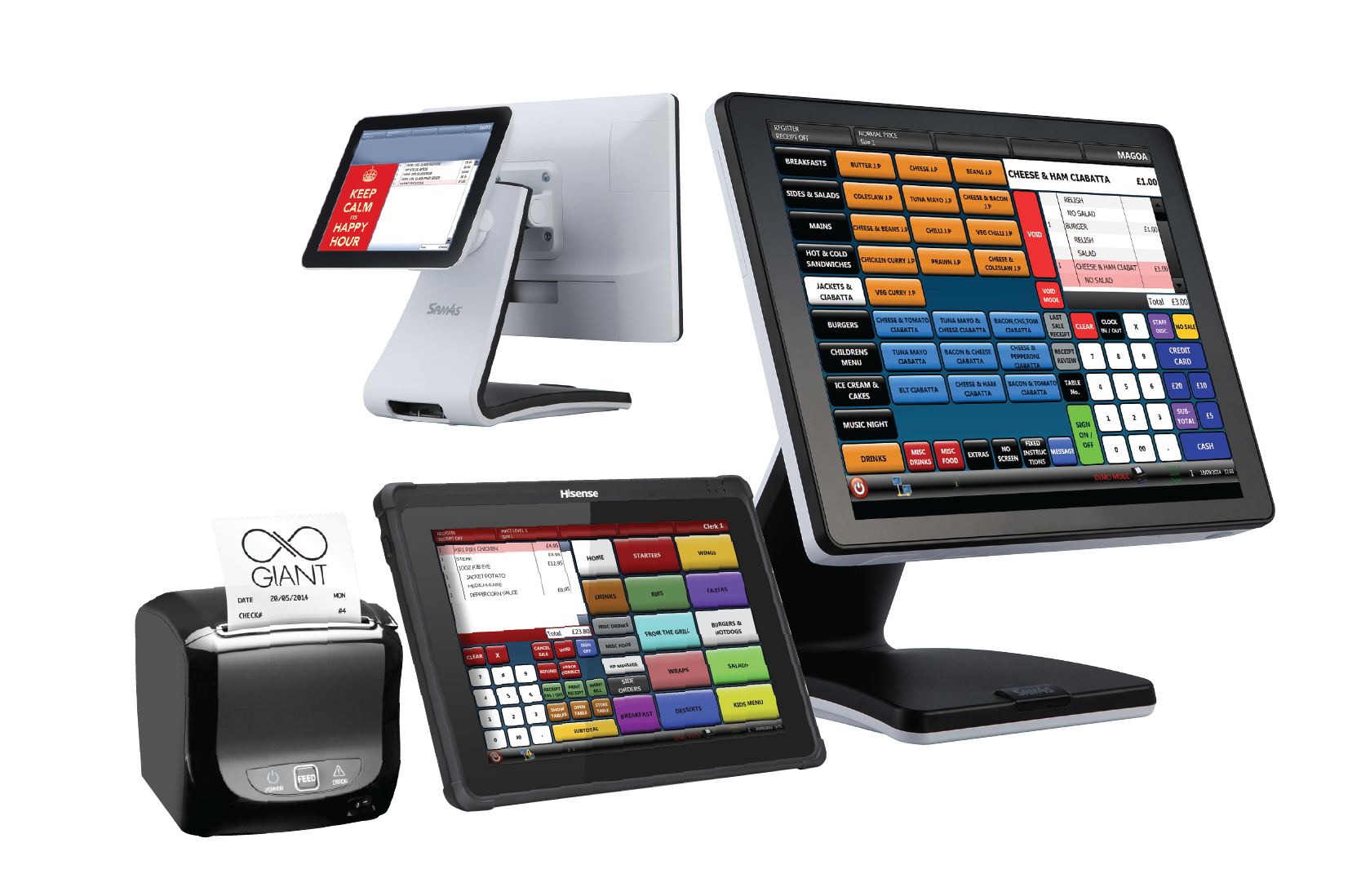
A counter-top EPOS setup: a touch screen till, a tablet till, a receipt printer and a cash drawer

01/ A new software landscape

The systems you already use should feel like one system.

Businesses rarely need another isolated app. They need the tools they already rely on to exchange information, remove repeated work and put the right answer in front of the right person.

Here is what it looks like when that is missing. The day’s takings come off the till on a Z-read. Someone keys them into a spreadsheet. At the end of the week the spreadsheet gets keyed into Xero or Sage. Stock is counted on paper on a Sunday, typed into the back office on a Monday, and the website still shows six of something you sold out of on Friday.

Nothing there is broken. Every one of those systems is doing what it was built to do. The problem is the gap between them, and the gap is currently filled by a person with a keyboard. RED EPOS brings hands-on EPOS and operational knowledge to that gap, along with the connected applications and AI-enabled software that close it.

02/ What I do

Software shaped around the work.
Not the other way round.

  1. 01

    Bespoke software development

    When the right application does not exist, I build it. Internal web tools, mobile apps, operational dashboards and customer-facing systems designed around your people, your information and the decisions they make.

    • Web applications
    • Mobile & field tools
    • Internal dashboards
  2. 02

    Application integration

    I connect software that currently lives in separate silos. EPOS, e-commerce, accounting, booking, customer service and the specialist tools unique to your business can share one reliable flow of information.

    • APIs & webhooks
    • Data synchronisation
    • Workflow automation
  3. 03

    AI for real business work

    I find where AI can make work faster or clearer, then put it inside a dependable process, with access controls, human review and the source information close at hand.

    • Business search
    • Analysis & summaries
    • Assisted drafting
  4. 04

    EPOS, support and operations

    I still supply, configure and support proven retail and hospitality platforms. The difference is that the work no longer stops at the till, and can now reach the wider operation.

    • Retail & hospitality
    • Cloud reporting
    • Ongoing support

03/ What gets connected

Four things I get asked to join up

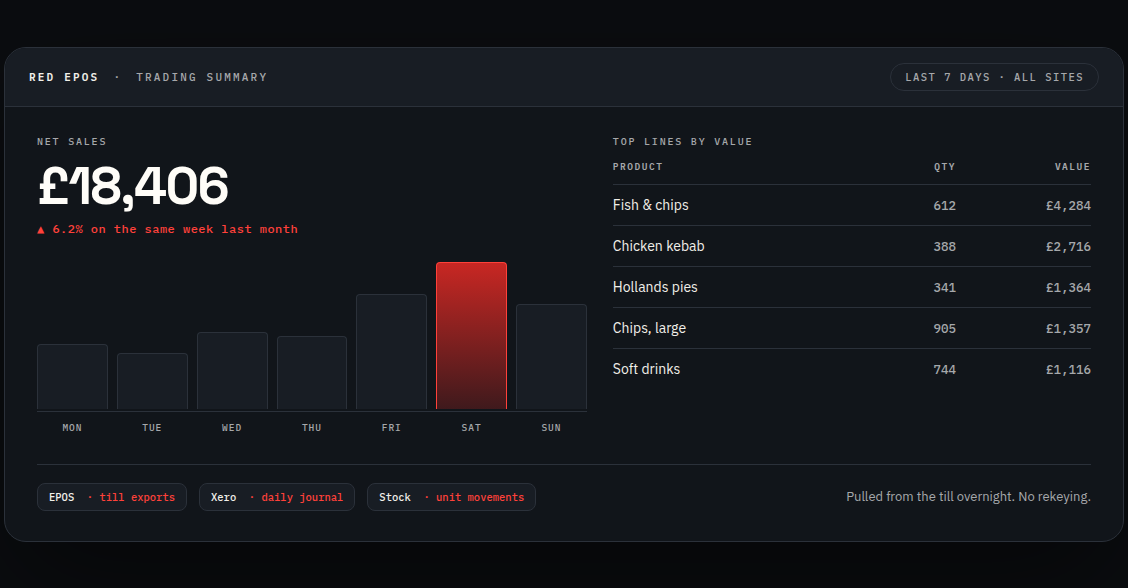
Example trading summary: net sales for the week, a daily bar chart and the top selling lines by value

Till to accounts

Xero, Sage and QuickBooks linked to ICRTouch. Daily takings, Z-reads and stock values land in the books on their own, in the right nominal codes, without anyone rekeying them. Your accountant gets clean numbers and you get your Monday morning back.
How this works

Delivery platforms

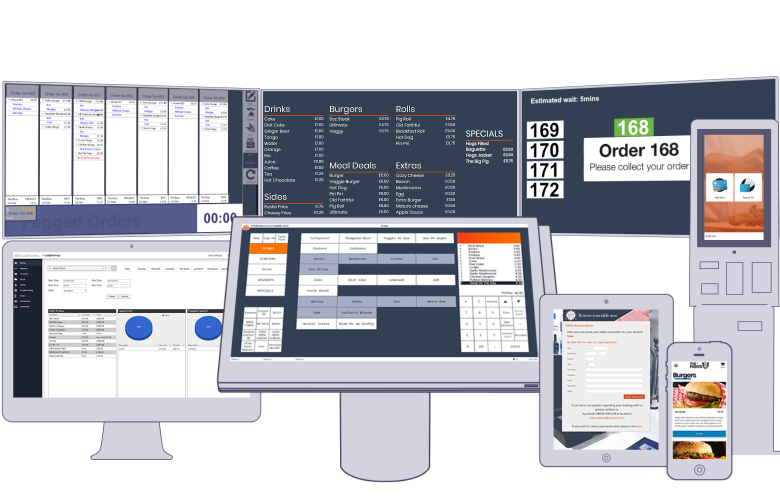
Deliveroo and Just Eat orders feeding the till and the kitchen screen instead of three separate tablets fighting for space next to the fryer. I work with these channels continuously through TouchTakeaway.

How this works

Shop floor to website

Stock and pricing kept in step between the counter and a WooCommerce site. Sell the last one in the shop and the website knows. Change a price once and it changes in both places.

How this works

Getting data out of the till

Tills are closed systems by design. I extract the sales data and put it somewhere useful: a live dashboard, a report that emails itself every morning, or straight into whatever other system needs it.

How this works

04/ Software ecosystem

Proven platforms. New connections.

I work across established EPOS, hospitality, e-commerce and payment software, and build the integrations that help them work together.

The EPOS side has not gone anywhere. I still supply, install, program and support tills: ICRTouch software, Sam4s and Aures hardware, cash drawers, receipt printers, kitchen screens and handhelds. That work is not a sideline to the software. It is the reason the software is any good. When I write an integration for a till, I am writing it for a system I have installed and fixed with my own hands.

If it has an API, webhook, database or usable export, there is usually a sensible way to bring it into the flow.

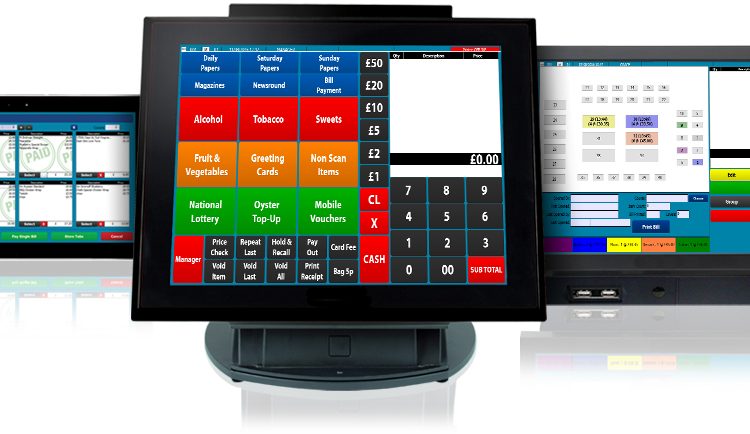
Three EPOS terminals side by side showing different till screen layouts

Core

EPOS platforms

  • ICRTouch — TouchPoint and the full range
  • CES Software — CES Touch, in retail and hospitality since 1997

Connected

The rest of the operation

  • WooCommerce — e-commerce and online stock
  • Deliveroo and Just Eat — delivery order channels, through TouchTakeaway
  • ResDiary — restaurant table bookings
  • Kitchen and order screens — tickets without paper

Extended

Accounts, payments and your own stack

  • Xero, Sage and QuickBooks — takings, VAT and stock values
  • Paymentsense, Sage Pay and Dojo — card transactions reconciled against the till
  • Your own web apps — APIs, exports and automation

05/ The practical AI advantage

The question is no longer “what can AI do?”

It is: where can it make a real difference in your business?

AI is changing the software landscape quickly. The businesses working out now what it can do will understand where it belongs, where it does not, and how to use it before the advantage becomes the expectation.

What I build with it is narrow and specific. AI combined with your own approved business information and your existing systems, so it can help with work that used to mean hours of searching, copying and cross-checking.

Where an answer comes from Three connected record sources — till and sales, accounts, and stock and orders — feed a question in the middle of the diagram. The question produces an answer on the right. A return arrow labelled “source” runs from the answer back to the records, so every answer can be traced to the record it came from. YOUR APPROVED RECORDS SOURCE Till and sales Accounts Stock and orders Question Answer

Search

Ask across your own records.

Find transactions, suppliers, trends or exceptions across the systems you have already connected, with a link back to the underlying record every time. You can always check where an answer came from, because the source is one click away.

Analyse

Compare periods and see what changed.

Compare one period against another, summarise how a product line or a site performed, and surface the patterns worth a closer look. It tells you where to look. You decide what it means.

AI should assist accountable people, not replace oversight. Every solution is shaped around permissions, privacy, source visibility and a clear human decision point.

06/ TouchTakeaway

Stop paying commission on your own customers

If you take orders through a third-party platform, you hand over a percentage of every order, forever, including from the customers who already knew your name. TouchTakeaway is your own ordering site, under your own brand, with your own customer list. ICRTouch publish their position on it plainly: “0% commission on every order, meaning 100% of the profit stays in your pocket.” Orders drop straight onto the till and the kitchen screen.

An online food order shown on a phone, a tablet and a desktop screen at the same time

07/ Built by RED EPOS

One live view of every support job.

The RED EPOS Help Desk grew from a real operational need: support tickets, booked visits, deadlines and updates all visible across the desk, the calendar and the phone.

It is the clearest example of what this business now does, because I built it for myself first and then found it was the thing customers wanted access to. There is an Android app as well as the web version.

If something has stopped working right now, do not use any of this. Ring 07885 671481. The remote support downloads are public and are not behind a login, because nobody should have to find a password while there is a queue at the counter.

RED EPOS HELP DESK

Job Customer Type Time left
Network POS 1 offline Customer 01 Call out Overdue
Menu change on TeamViewer Customer 02 Prg 2h 11m
Printer not cutting receipts Customer 03 Fix 4h 40m
Add Friday discount to system Customer 04 Prg 14h 15m
Second till for the new counter Customer 05 Call out 1d 14h
Interface shown with anonymised representative data.

08/ How I work

Start with the awkward bit.

The duplicated task. The report nobody trusts. The system that will not speak to the other one. That is usually where the best project begins.

01

Understand

Map the work, the people and the real decision points.

02

Connect

Reuse the good systems and create a reliable flow between them.

03

Build

Develop only what is missing, then test it against the working day.

04

Improve

Support the solution and keep adapting it as the business changes.

How a job actually runs

09/ Tell me what does not connect

Let’s make the work flow.

The first conversation is free and it is usually short. Tell me what systems you run and what you keep having to type twice. I will tell you whether it can be connected, roughly what it involves, and if the answer is no, I will say so rather than sell you something that will not work.